
Intro





I. Introduction
CompanionsPlus —— A useful player companion plugin CompanionsPlus allows you to easily create your own custom companions (truly unlimited possibilities) It does not conflict with other companion plugins, so your players can use both. When activated, the companion follows you to your shoulder (or wherever you configure it) and grants players various abilities. CompanionsPlus supports all versions from 1.8.0 - 26.x, including various minor versions, and will support future versions as soon as they're released

- Uses MYSQL and local SQLITE storage
- GUI Operation, 99% customizable content
- Companion Models > Customize companion models, unlimited possibilities
- RGB Colors > Companions support RGB colors
- Companion Abilities > Supports various fun abilities and potion buffs, see Companion Abilities for details
- Companion Attributes > Supports multiple buff types, see Companion Attributes for details
- Companion Shop > You can customize any number of companions and list them in the companion shop
- Companion Storage > Companions purchased by players appear in companion storage
- Companion Upgrade > Companions can be upgraded
- Companion Items > Customize companion held items
- Companion Names > Customize companion names
- Companion Variables > Supports PlaceholderAPI variables
- Companion Currency > Built-in currency for purchasing and upgrading companions
- Highly Customizable > As mentioned, possibilities are endless, create perfect companions for your players
- Highly Configurable > You can create custom companions, set their appearance, abilities they grant, items they hold, names they have, etc. GUI and abilities are also customizable
- Custom Abilities > You can provide PVP-like abilities or static potion effects during defense/attack
- Additional abilities such as jump ability, flight ability, and even fireball ability
- Command abilities, allowing you to execute commands every x minutes with x chance! (This allows custom abilities)
- Built-in companion examples for you to modify, get inspiration from, or copy! Custom companion creation couldn't be simpler!
- Companion Boxes > Supports multiple mystery boxes, tiered weights, blacklists and sneak right-click preview, see Companion Mystery Box for details
- Multi-instance Companions > The same companion type can be held multiple times, with level, quality, name and equipment managed independently
- Permission Companions > With
isHavePermissionenabled, companions are automatically granted or removed based on permissions (1.2.4+) - Armor Trims > Minecraft's new feature (1.4.0+)
- Multi-Currency > Supports PlayerCurrency plugin multi-currency for purchasing/upgrading companions
- Data security, configurable automatic backup of full data to backUp folder
- Supports MiniMessage (2.0.0+)
- Supports CraftEngine models for companions and companion equipment (2.3.0+)
- Supports ItemsAdder models for companions and companion equipment (2.6.0+)
Supports ModelEngine models for companions (2.7.0+) 30. Supports BetterModel models for companions (3.1.0+) 31. Mob Appearance & Capture > Supports virtual mob companions and melee capture, see Mob Capture for details 32. Quality & Random Attributes > Six quality tiers by default, supports range formulas, attribute display and quality refinement 33. Warehouse Management > Supports permission-based capacity limits, companion release with double confirmation, see Companion Warehouse for details 34. Plugin is constantly being updated, recommend checking Update Log for latest updates 35. Multi-language configuration Click to view
II. Plugin Dependencies
All are optional
PlaceholderAPI PAPI variables
PlaceholderAPI
Vault Economy plugin (requires base plugins like ess, cmi, etc.)
Vault
PlayerPoints Points plugin Requires 3.0.0+
PlayerPoints
PlayerCurrency Multi-currency plugin Requires 1.0.3+
PlayerCurrency
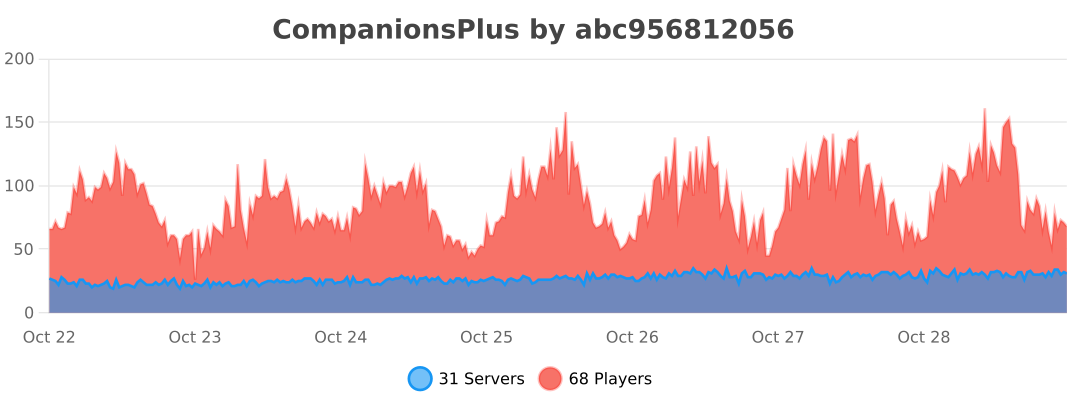
III. Usage Statistics
IV. Download
Purchase on AfdianPurchase on MC9Y
V. Join Community
Click to join plugin discussion group